Invoice-grade AI usage tracking
Every AI call is now stored with its cost. Each month is frozen into a statement per tenant, and biz invoices from that statement in platform-admin.
Status as of 26 Sep 2026
- Stage
- In review. Three stacked PRs are open. Nothing is merged, nothing is on beta, nothing is in a production tag.
- PR 1
- #475 Durable AI usage ledger (backend)
- PR 2
- #476 Monthly statements and close job (backend, on top of #475)
- PR 3
- #477 Platform-admin statements page and CSV download (on top of #476)
- Ticket
- SP-740
- Review
- Review fixes applied 26 Sep 2026 on all three PRs (legacy row pricing, write time cap, money format, actor email, 500 on failed close)
- Screenshots
- All screenshots and the video come from a local stack with mock data. The tenants and numbers are not real.
Why this exists
Tenants that use the platform AI key do not pay Google themselves. We pay Google, and then we invoice the tenant. Google sends us one bill for all tenants together, so the only way to split it per tenant is our own ledger. Before this work the ledger was best effort: a failed write was lost, cost was worked out again every time someone opened a report, and a price change could quietly change a past month. That is fine for a dashboard, but not for an invoice.
What changed, in one picture
AI call starts
A user asks the tutor, imports a quiz, refreshes a course.
Pending row
A row is written before we call the provider, so the call is on record even if it crashes.
Finalized row with cost
After the call the same row gets tokens, searches, images, cost in USD and the price version.
Monthly statement
On the 2nd, a job freezes each tenant's month into a statement with a revision number.
Invoice
Biz reads the billable cost, downloads the CSV, sends the invoice and locks the statement.
Demo video
About 2 minutes, no sound. The blue dot is the mouse.
What you see
- Platform-admin, AI usage page, moved from September back to August 2026.
- Scroll down to the new Statements card and open Real Success Academy.
- Tenant Usage tab, AI statements for August: Closed, revision 2. Scroll through by feature, by model, by key source and by day.
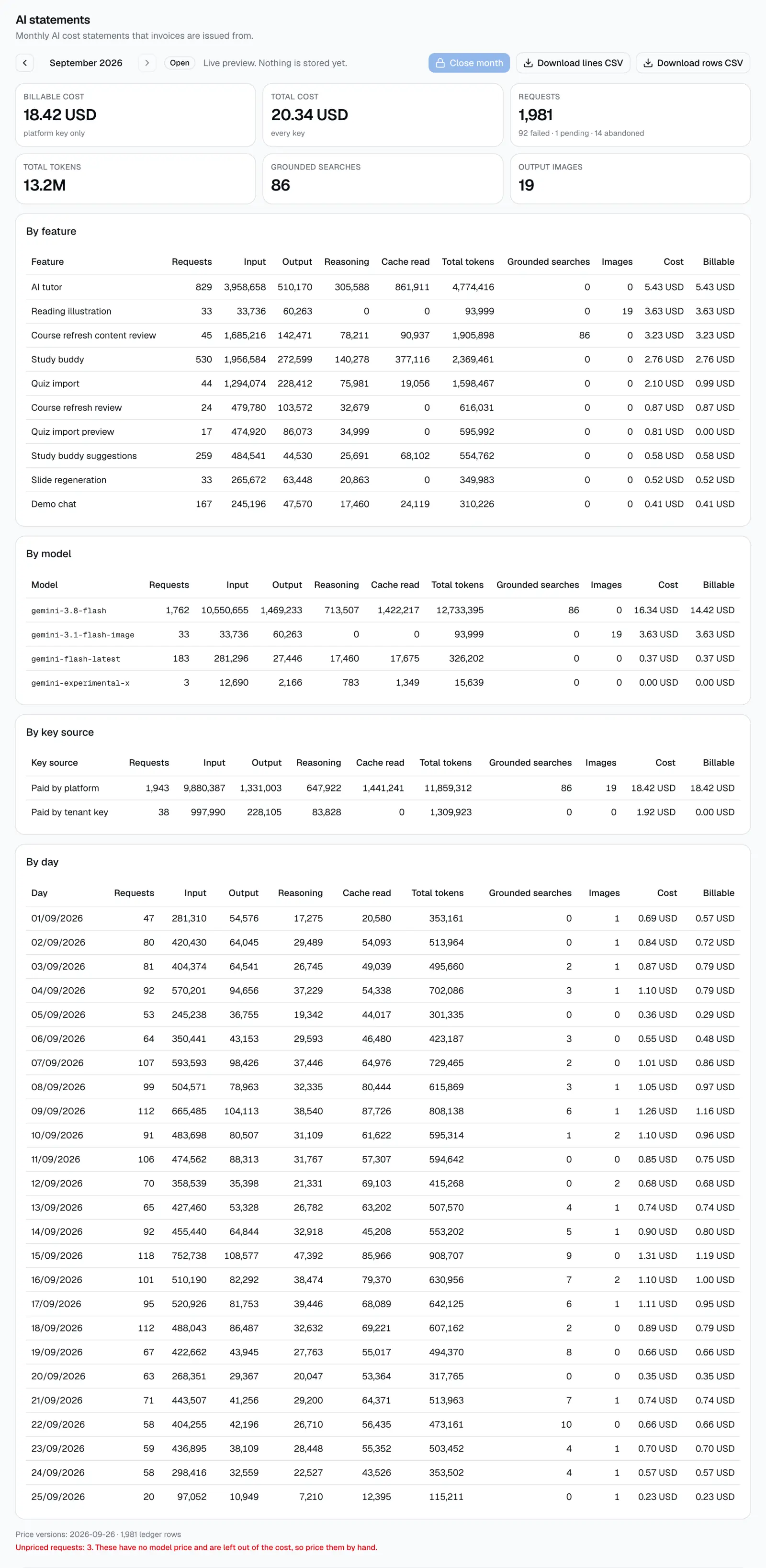
- September: an open live preview. Close month is greyed out because the month has not ended.
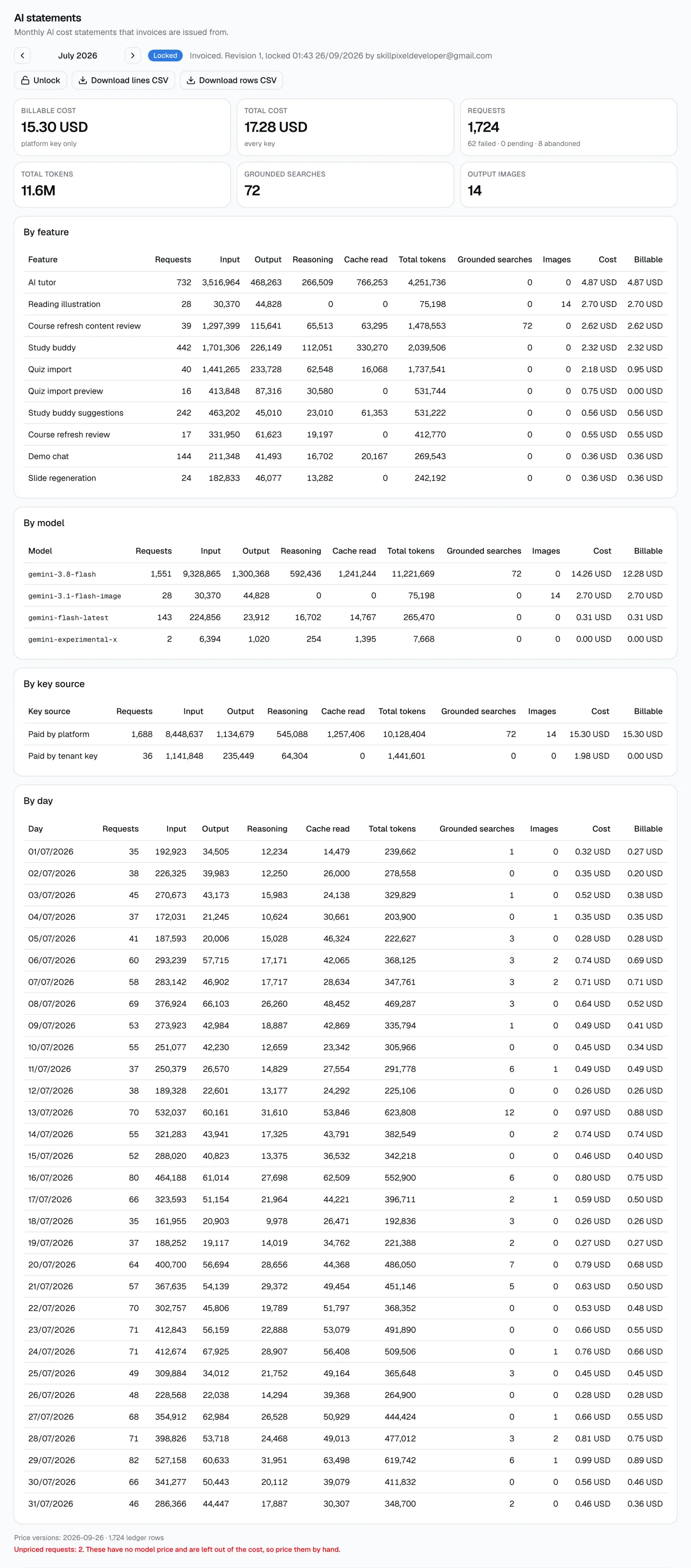
- July: Locked. Only Unlock and the two CSV buttons are left.
- Back to August: Re-close and confirm. The statement becomes revision 3. The video was recorded before two later re-closes, so the screenshots on this page show revision 4. That is expected, not a mismatch.
- Lock and confirm, then Unlock and confirm, so the statement is Closed again.
- Download lines CSV and rows CSV (both files really download), then back to the Statements card, which now shows Real Success Academy at revision 3.
The month-to-month routine for biz
-
On the 2nd, the job closes last month
At 01:00 UTC on the 2nd of each month a scheduled job closes the previous month for every tenant. Each tenant gets a stored statement at revision 1, closed by "the monthly job". You do not need to do anything for this step.
-
Open platform-admin > AI usage > Statements
Pick the month. The card lists every tenant's statement with status, revision, cost and billable. Check two things first: "Tenants without a statement" should be 0, and the red Unattributed line, if it shows up, needs a look before you invoice.
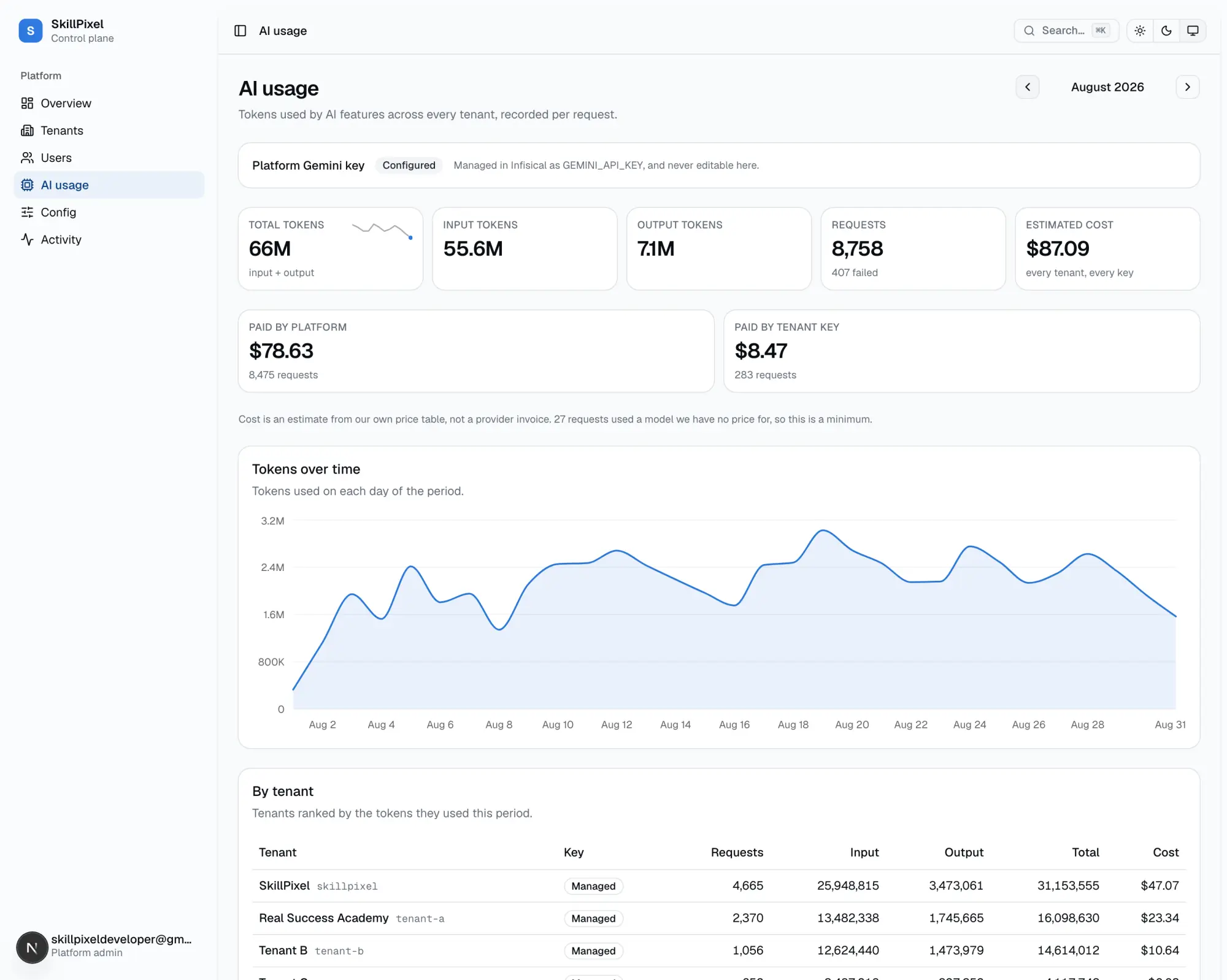
The AI usage page (August 2026). The top part is the existing live report: 87.09 USD for every tenant and every key, 78.63 USD on the platform key and 8.47 USD on tenant keys. The Statements card is further down the same page. 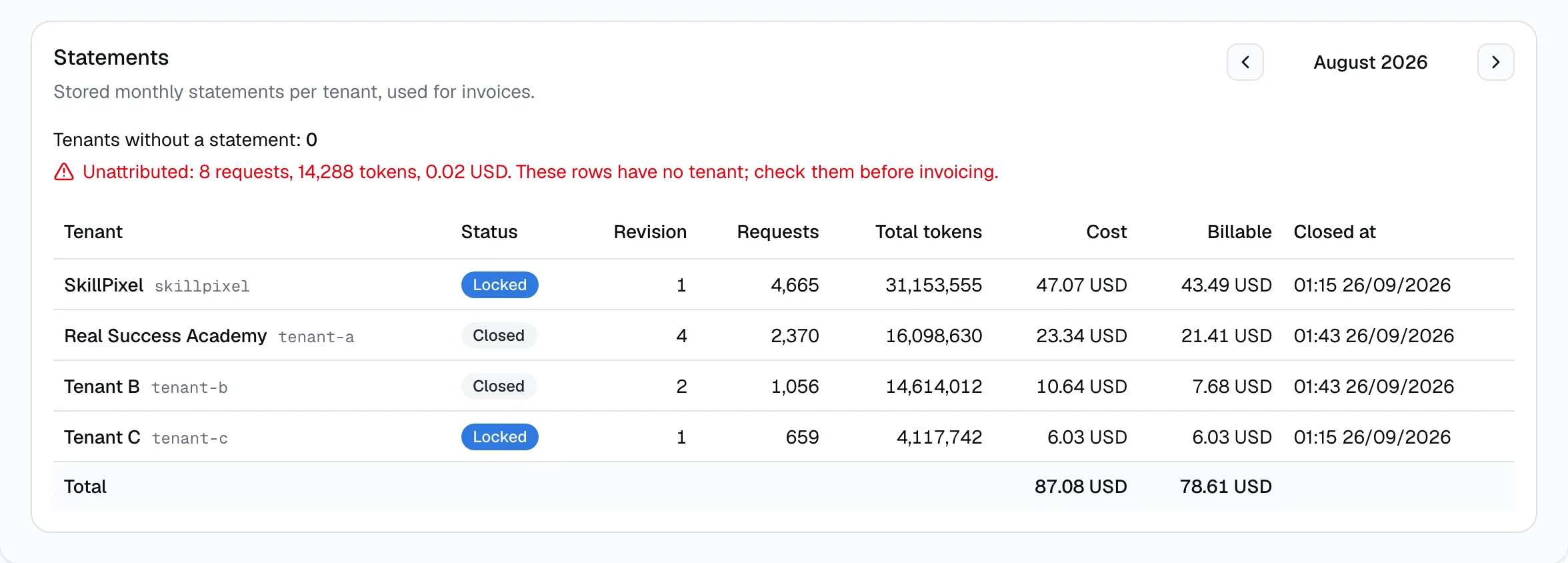
The new Statements card. Four tenants, two Locked and two Closed. Total 87.08 USD cost, 78.61 USD billable. "Tenants without a statement: 0". The red line shows 8 requests (0.02 USD) that have no tenant. The live report above says 87.09 USD because it also counts those unattributed rows, and the card adds up amounts already rounded to the cent. -
Open the tenant > Usage > AI statements
Click a tenant in the card. On its Usage tab, the AI statements section starts on the previous month, which is the month you invoice.
-
Check the status
The badge next to the month says what you are looking at:
- Open live preview, nothing stored yet. Do not invoice from this.
- Closed stored as revision N, with who closed it and when. This is what you invoice from.
- Locked the invoice was sent. The numbers cannot change until someone unlocks it.
-
Re-close only if needed
Re-close rebuilds the statement from the ledger and adds 1 to the revision. Do this only when something changed after the close, for example a call that finished late or a price that was fixed by hand. If nothing changed, the numbers stay the same and only the revision goes up.
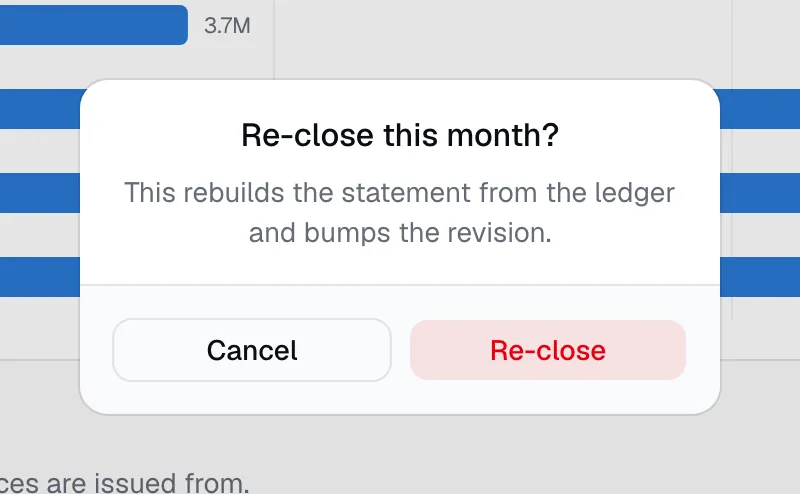
Re-close always asks first. -
Download the CSV files
Lines CSV is for the invoice: one row per feature, model, key source and day, and a total row at the end. Rows CSV is for disputes: every single AI call of that tenant in that month, with time, feature, model, tokens, cost and ids. The file name has the tenant and the month, for example "tenant-a-2026-08-ai-usage-lines.csv".
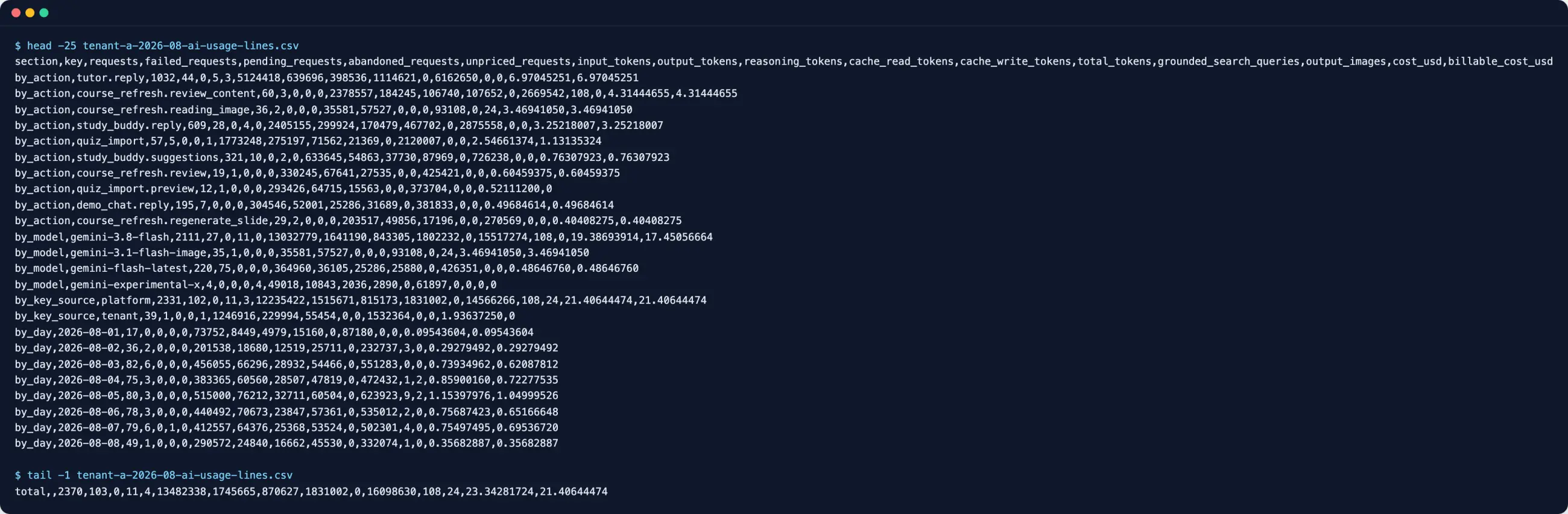
Lines CSV for Real Success Academy, August. The last row is the total: 2,370 requests, 23.34 USD cost, 21.41 USD billable. The file the browser saved is byte-for-byte the same as the one fetched directly from the server. 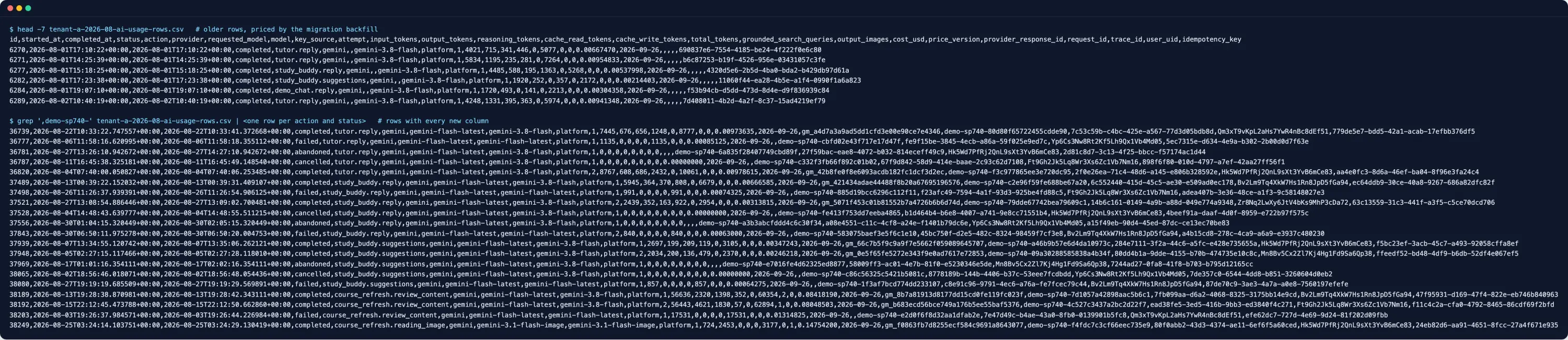
Rows CSV, same tenant and month (2,370 rows, click to zoom). The first 6 rows are older rows priced once by the migration, so their tracing columns are empty. The rest show one row per feature and status: completed, failed, cancelled, abandoned, and retries. -
Lock after the invoice is sent
Lock freezes the statement. Re-close is blocked, including by the monthly job. If a mistake is found later, a platform admin can unlock it, re-close, and send a corrected invoice. Unlock is logged.
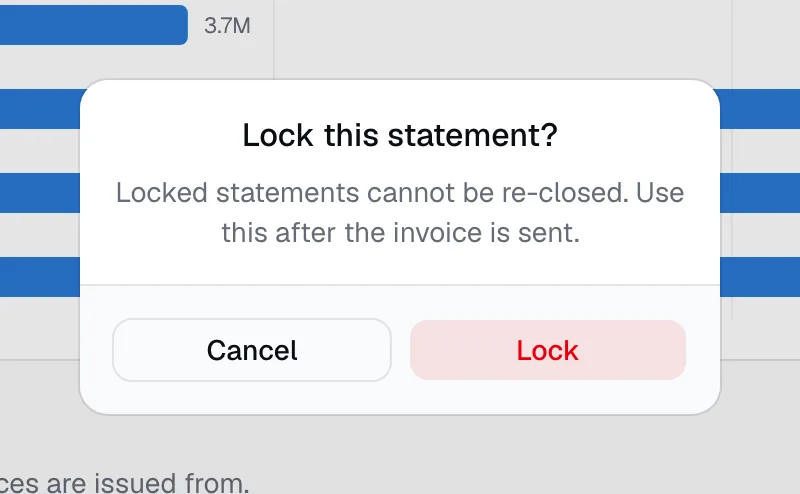
Lock also asks first.
Reading a statement
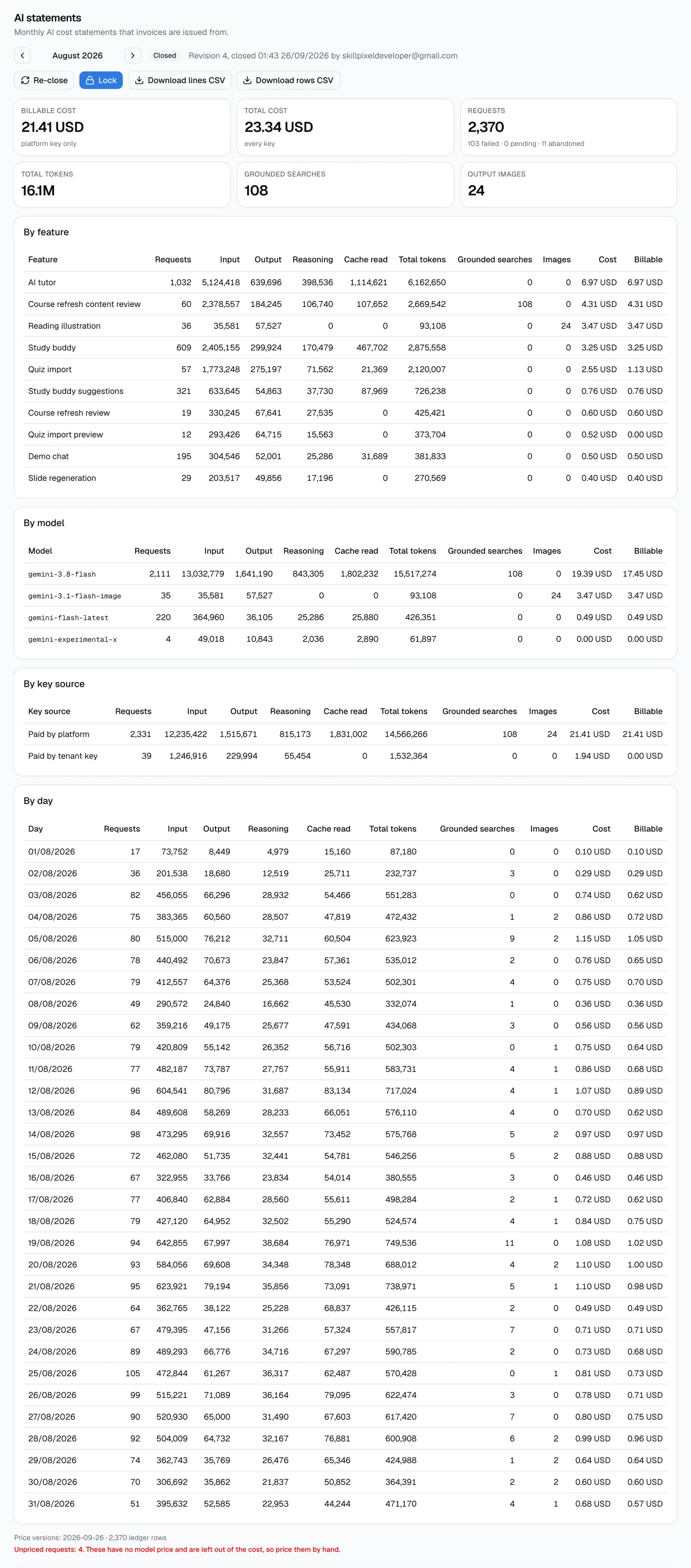
The six tiles
| Tile | What it means | RSA, Aug |
|---|---|---|
| Billable cost | Cost of calls on the platform key only. This is the number to invoice. | 21.41 USD |
| Total cost | Cost of every call, on any key. Calls on the tenant's own key are paid by the tenant straight to the provider, so they are in this number but not in billable. | 23.34 USD |
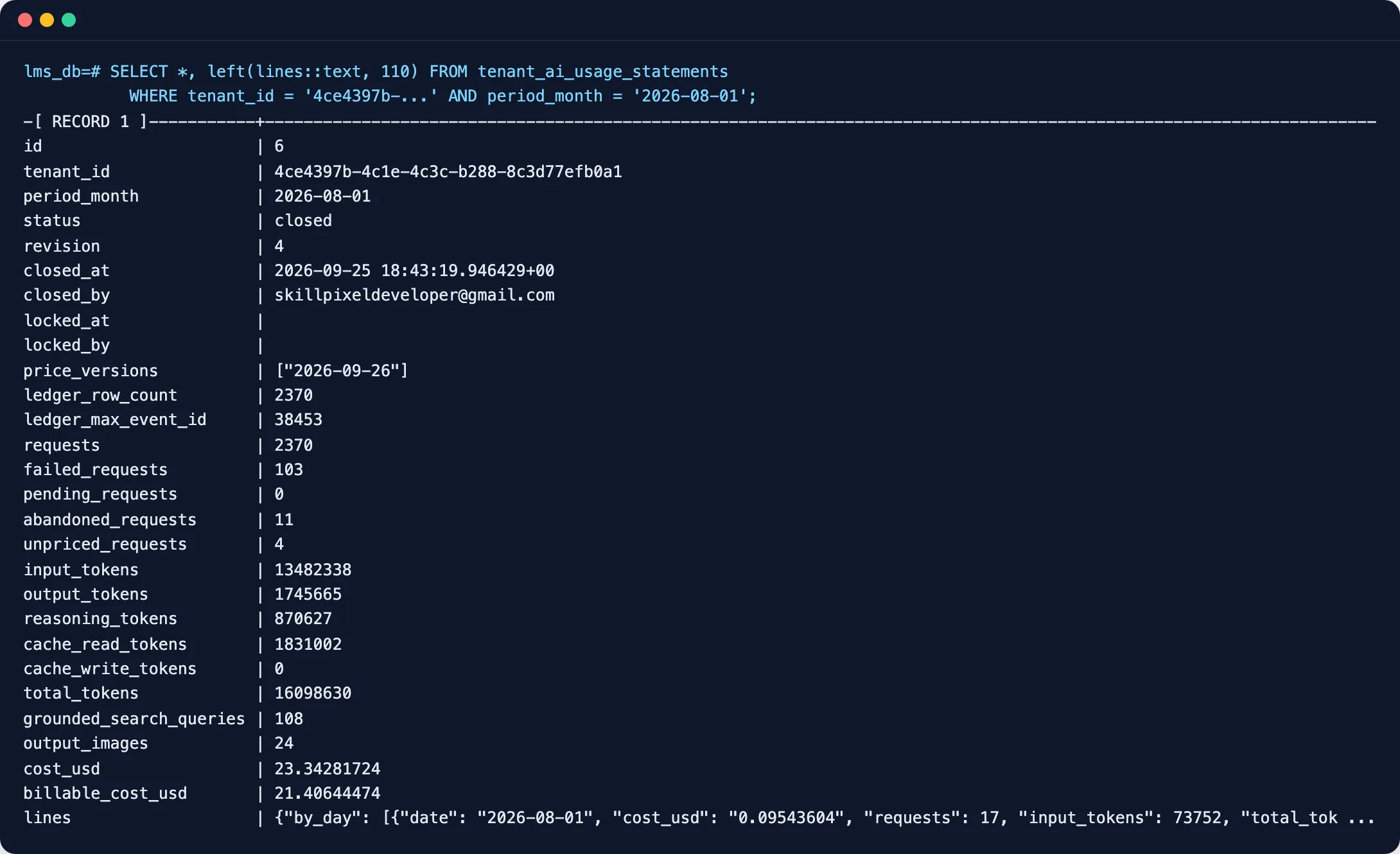
| Requests | All calls, plus how many failed (the provider returned an error; they still cost whatever tokens were used), pending (still running) and abandoned (started but never finished within 1 hour, for example the server restarted). | 2,370 |
| Total tokens | Input, output, reasoning and cache tokens together. | 16.1M |
| Grounded searches | Google Search queries made by the model (course content review). Priced at 14 USD per 1,000. | 108 |
| Output images | Images the model created (reading illustrations). | 24 |
The four tables
- By feature: which part of the product used AI (AI tutor, study buddy, quiz import, course refresh, and so on).
- By model: which AI model was used. A model with no price shows 0.00 USD.
- By key source: "Paid by platform" vs "Paid by tenant key". Billable is always 0.00 USD on the tenant key line.
- By day: one line per UTC day with usage. Handy when a tenant asks "why was the 19th so high?".
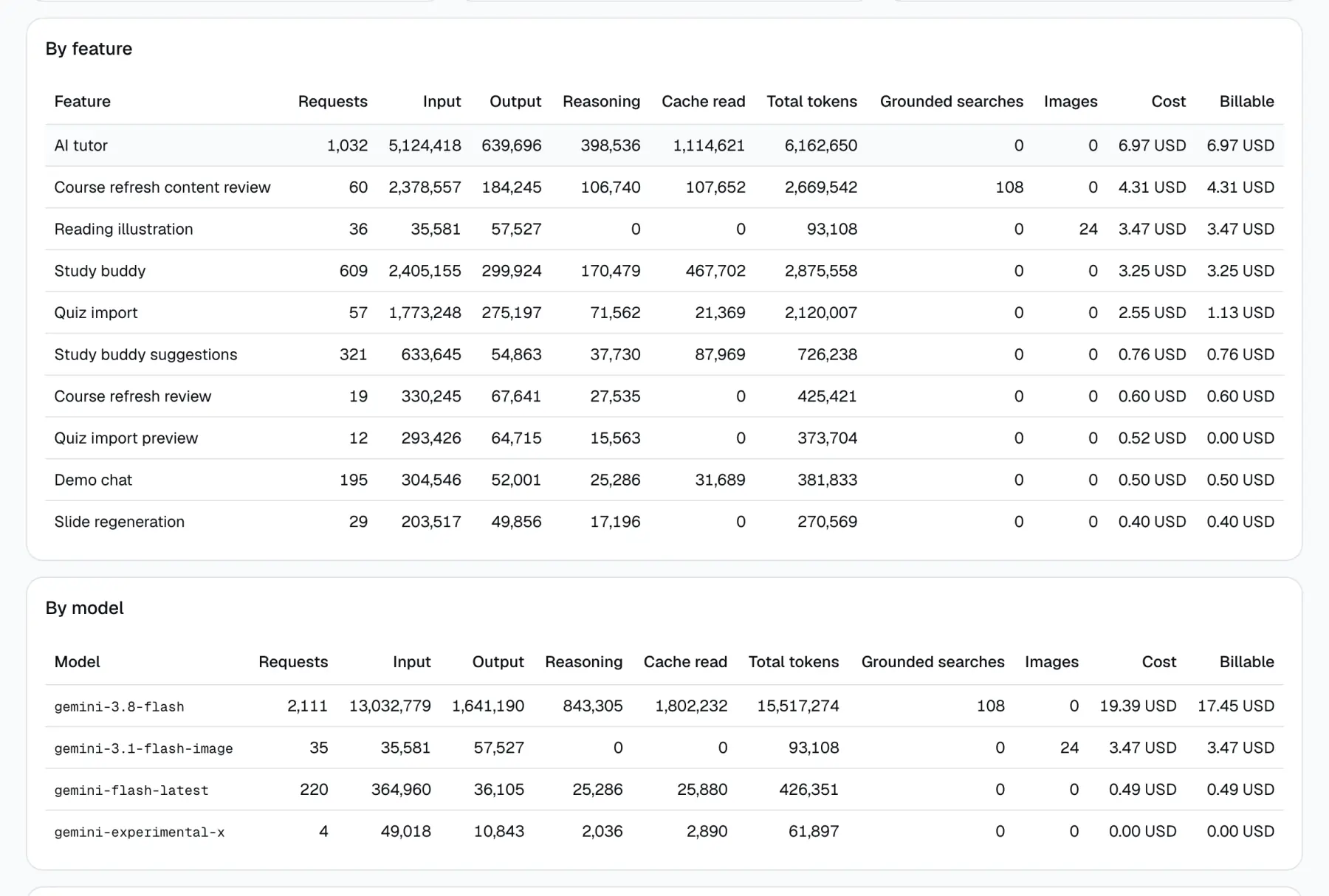
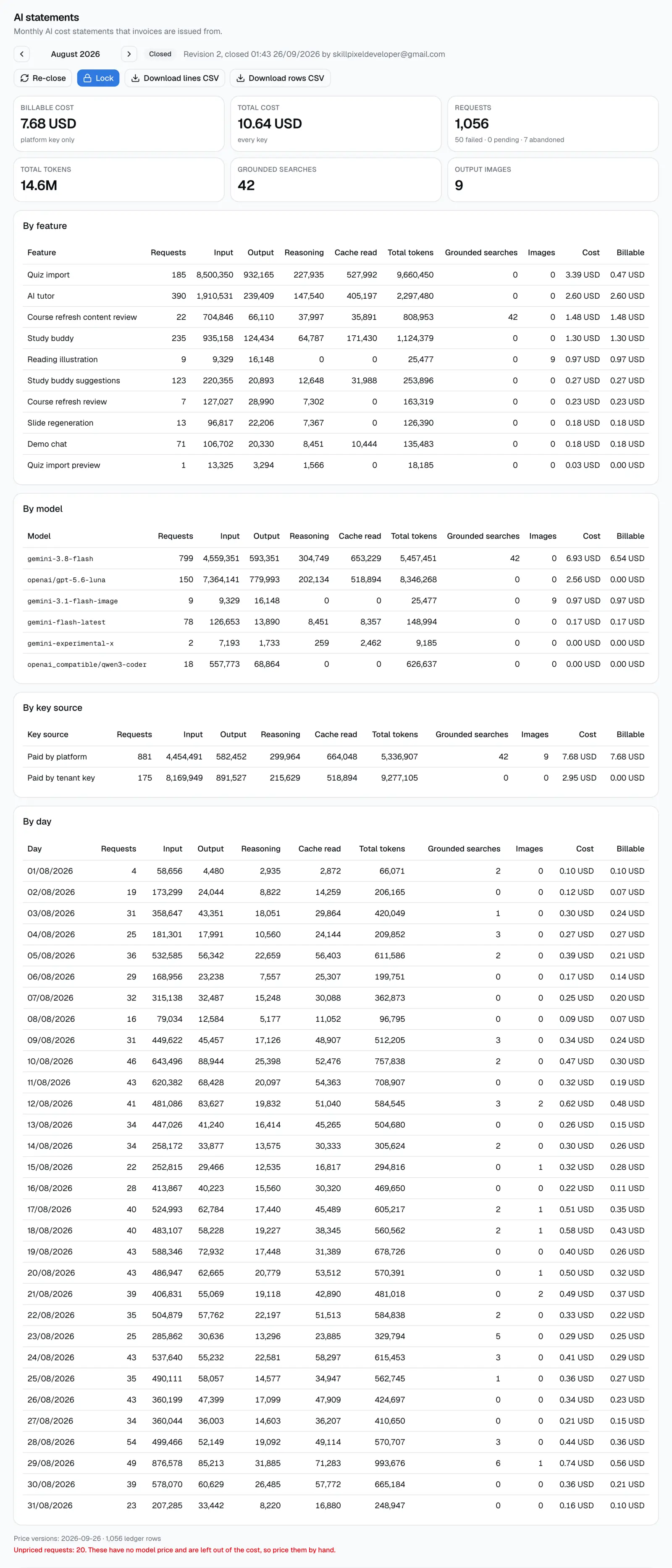
Each table has Cost and Billable columns. When they differ on a line, part of that line ran on the tenant's own key. In the shot below, Quiz import is 2.55 USD cost but only 1.13 USD billable.
The footer: price versions, ledger rows, unpriced requests, revision
- Price versions: which version of our price table the rows used. Each row keeps the price of the day it was written, so a later price change never moves a past month.
- Ledger rows: how many stored calls went into the statement (2,370 for RSA in August).
- Unpriced requests (red): calls on a model we have no price for. They count as 0 in the cost, so the cost is a minimum. Price them by hand.
- Revision: in the status line at the top. Revision 1 is the monthly job. Each re-close adds 1. Always write the revision on the invoice so everyone knows which numbers were used.
Tenant B: billable is not the same as total cost
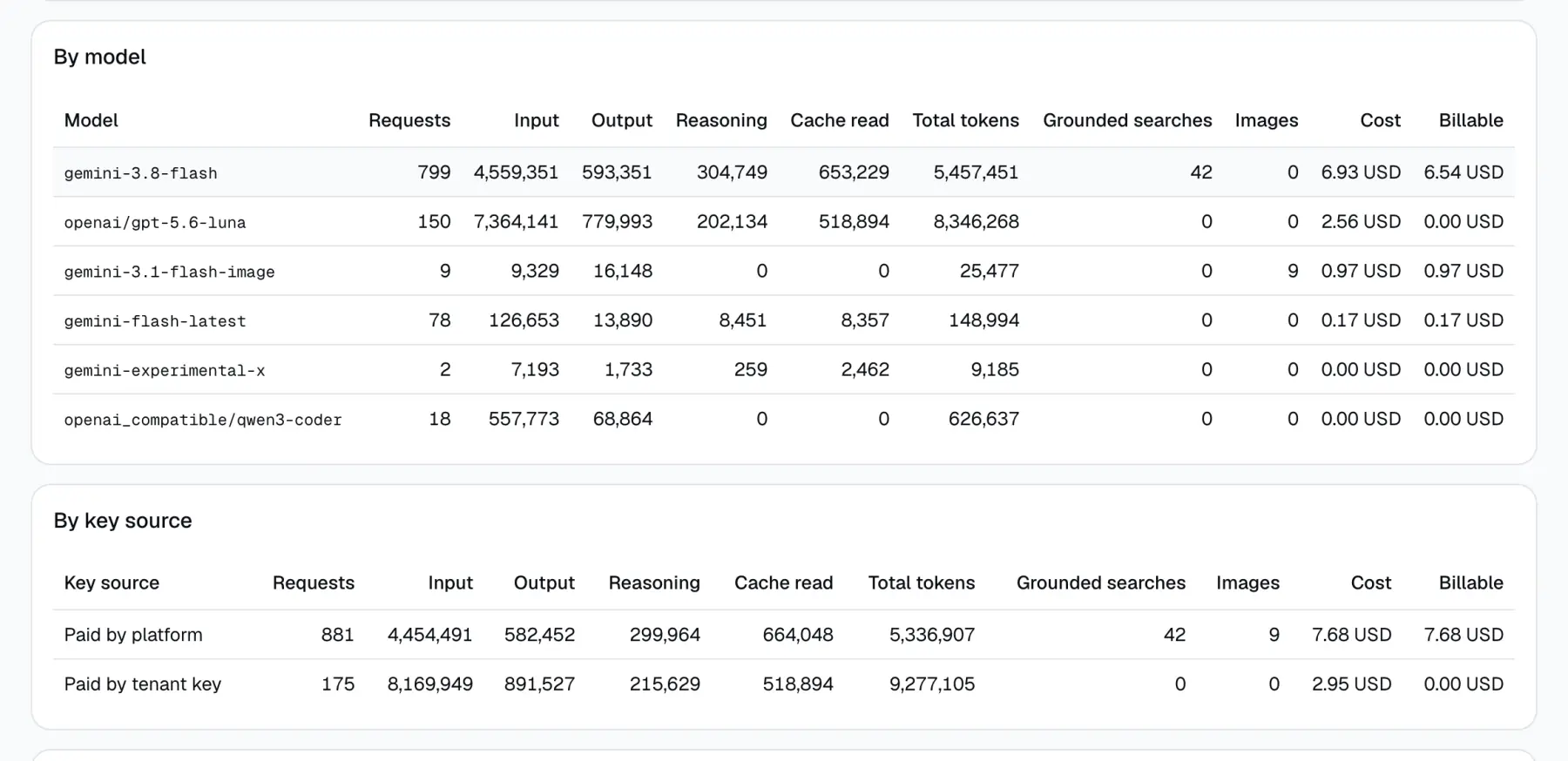
Tenant B uses its own OpenAI key and its own OpenAI-compatible gateway for quiz import, and the platform Gemini key for everything else. In August 2026 (mock data):
- Total cost is 10.64 USD.
- 175 requests ran on Tenant B's own key, worth 2.95 USD. Tenant B pays that to the provider directly, so we do not invoice it.
- Billable is what is left: 7.68 USD (10.64 minus 2.95, the last cent is rounding). This is the number on the invoice.
- 20 requests are unpriced. 18 of them ran on Tenant B's own gateway model (qwen3-coder), so they are not invoiced, but the total cost is too low. The other 2 ran on the platform key with gemini-experimental-x, so they are part of what we invoice and must be priced by hand before the invoice goes out.
Locked and open months
Why the numbers can be trusted
- A row before and after every call. A pending row is written before we call the provider, and the same row is finished after. If the server dies in the middle, the row stays and later shows as abandoned. Nothing disappears silently.
- Retries. If the database write fails, it tries again (3 attempts in total).
- Safe when a user leaves. If the user closes the page or the request is cancelled, the write still finishes.
- Cost is frozen per row. Each row keeps its USD cost and the price version it used. Changing the price table later does not change a past month.
- Provider response id. Each row keeps the id the provider gave the call, so one call can be matched to the provider's own records in a dispute.
- Rows survive tenant deletion. Deleting a tenant no longer deletes its usage. A deleted tenant still has statements, shown as "Deleted tenant".
- Unattributed bucket. A call with no tenant is still stored, shown in red on the Statements card and sent as an alert. Before, it was skipped.
- Dropped writes raise an alert. If a row still cannot be written after all retries, it is logged as an error with the full row and sent to PostHog as an event, so we know and can add it back.
- Statements are frozen. A statement is a stored copy with a revision number. Re-close makes a new revision. Lock stops any change, including by the monthly job.
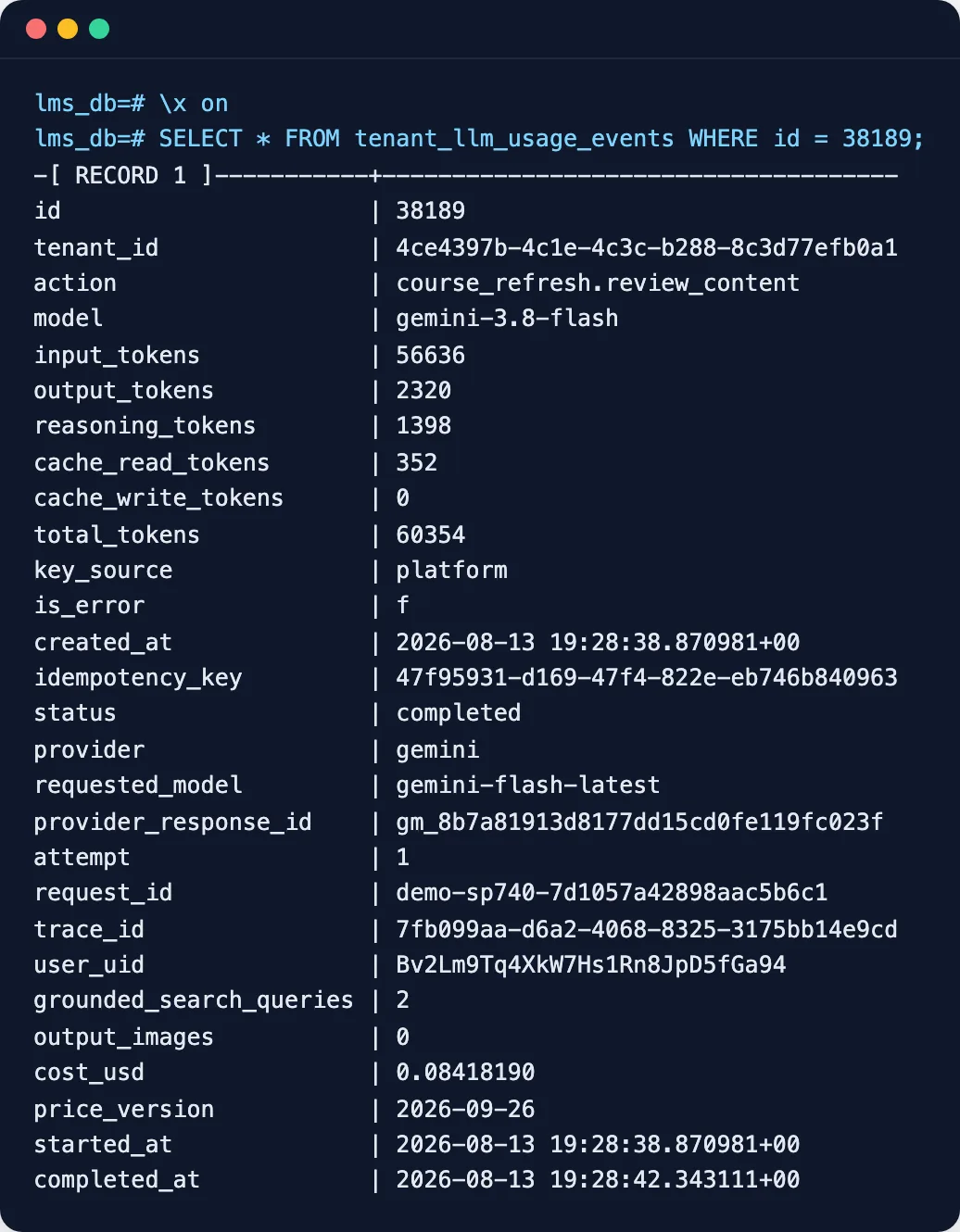
Checked by hand on one row. Row 38189 (course content review, RSA, 13 Aug): 56,284 input tokens at 0.75 USD per million, 352 cache tokens at 0.075, 3,718 output and reasoning tokens at 3.75, plus 2 Google searches at 0.014 each. That is 0.08418190 USD, exactly what the row stored.
Known limits
- Grounding is a minimum. When the provider does not say how many Google searches a call made, we count 1. The real number can be higher.
- Grounding is billed at full rate. Google gives a shared free pool of searches each month. We do not split that pool across tenants, so every search is priced at 14 USD per 1,000. This was a choice, not a bug.
- Image cost comes from tokens. Output images are counted, but their cost is from the image model's token price, not a per-image price.
- Unpriced models need hand pricing. Models with no price entry, mostly tenants' own OpenAI-compatible gateways, count as 0. The statement shows how many.
- A call that finishes after the close needs a re-close. If a call was still running when the month closed, the statement does not see its final numbers until someone re-closes.
- No automatic check against the Google bill yet. We decided to skip this for now. Compare the platform total with the Google bill by hand once a month.
- First deploy needs a one-off backfill. During the deploy, the old app keeps writing rows without cost for a few minutes. Those rows count as unpriced until a one-off cost backfill runs.
Decisions taken
| Decision | Choice |
|---|---|
| What we invoice from | Raw provider cost in USD, stored on each row when it is written. No markup or rate card in the app; biz applies pricing outside. |
| Month close | A scheduled job freezes each tenant's month on the 2nd of the next month. Biz can re-close before the invoice goes out, then lock. |
| Check against the Google bill | Skipped for now. |
| How a row is written | Pending row before the call, finished after, with retries, safe from cancellation. A dropped write is logged as an error and sent to PostHog. |
| Failed calls | Stored with whatever usage the provider returned, and priced from those tokens. Not hidden. |
| Extra billable units | Google Search queries (14 USD per 1,000, full rate) and output images, tracked per row. |
| Deleted tenants and calls with no tenant | Rows survive tenant deletion. Calls with no tenant are stored as unattributed and alerted, not skipped. |
| Export | A statement page per tenant in platform-admin, with CSV download of the statement lines and the raw rows. |
Rollout checklist
- Merge bottom-up: #475, then #476, then #477. Wait for CI on each.
- Run the two database migrations (ledger changes, then the statements table) on beta, and later on prod.
- Create a Cloud Scheduler job for beta and one for prod: POST to the close-month endpoint on the 2nd of each month at 01:00 UTC, with the cron secret header, like the storage snapshot job.
- Run the one-off cost backfill for rows the old app wrote during the deploy.
- Do the first close by hand (for example August or September) and check that "Tenants without a statement" is 0.
- Beta walkthrough: close, re-close, lock, unlock, both CSV downloads, and the Statements card.
- Move SP-740 to Testing after beta, and to Done once it is in a production tag.